A privacy-first app that teaches children real money skills through visual jar budgeting, chore tracking, and interactive financial simulations. Two editions built for families and classrooms.
Family Edition
OurDigitalAllowance
For parents & kids at home
School Edition
OurDigitalAllowance
For teachers & classrooms
Two Editions, One Purpose
Built for Families and Classrooms
Whether you're teaching your kids at home or running a classroom economy, OurDigitalAllowance has an edition designed just for you.
All data stored on your device. No social sharing, no profiles, no external data collection.
No Subscriptions
No recurring fees, ever. Family Edition is $2.99. School Edition starts at $9.99 per license with volume discounts.
No Bank Needed
No bank integrations or debit cards. Teach money concepts without the complexity.
Works Offline
Fully functional without internet. All data stays on your device, always accessible.
Simple to Use
Up and running in minutes
No complicated setup. No technical know-how needed. Just download and start building great money habits.
1
Download the App
Available on iOS and Android. Family Edition is $2.99. School Edition starts at $9.99 per license with volume discounts available. No subscriptions, ever.
2
Set Up Your Profile
Add your children or students by name. Create chores, set jar goals, and customize rewards in minutes.
3
Watch Them Grow
Kids earn, save, and learn as their jars fill up. Parents approve, teachers reward, and everyone celebrates goals.
Pricing
Simple, Honest Pricing
No subscriptions, no hidden fees. Buy once, use forever.
Family Edition
For Parents & Kids
$2.99
One-time purchase
Up to 6 children
All features included
All learning games
iOS & Android
School Edition
For Teachers & Schools
$9.99
per license — volume discounts available
100–499 licenses: $8.99 each
500–999 licenses: $7.99 each
1,000–2,499 licenses: $6.99 each
2,500+ licenses: $4.99 each
MDM auto-discounts supported
Follow Our Journey
Stay up to date on our launch and financial literacy tips for families and classrooms
Teach your kids to earn, save, and invest through visual jars, chore tracking, and interactive money simulations — all on your family's device.
Everything Included
Built for parents and kids aged 4-18
Every feature your family needs to start building real money habits — no bank account, no subscription, no complexity.
Visual Money Jars
Four animated jars (Spending, Short-Term Savings, Long-Term Savings, Other) that visually fill up as kids earn money.
Chore Tracking
Set weekly recurring chores, bonus jobs, and custom tasks. Kids mark them complete, parents approve and pay out.
Savings Goals
Kids set a savings goal (like a new bike), add a photo, and watch their jar fill toward it with a progress bar.
Money Tree Simulator
A visual tree that shows how savings grow over time. Compare safe savings vs. index funds vs. stocks with the Rule of 72.
Financial Mini-Games
Interest Explorer, Budget Hero, Investment Island, and Double or Nothing — fun ways to learn compound interest and budgeting.
Multi-Child Support
Add unlimited children, each with their own jars, chores, goals, and earnings history. Manage everyone from one dashboard.
Spending Tracker
Parents manually subtract when kids spend. Optional "Owed vs. Paid" toggle teaches real-world IOU and credit concepts.
Jar Allocation Templates
Use the "Smart Saver" template (50/30/20 split) or create custom allocation rules for each child.
Manual Income Entry
Older kids with babysitting or neighbourhood jobs can enter earnings manually and choose their own jar allocation.
See It In Action
Real screens from the Family Edition
From first setup to managing multiple kids — here's exactly what your family will experience.
Getting Started
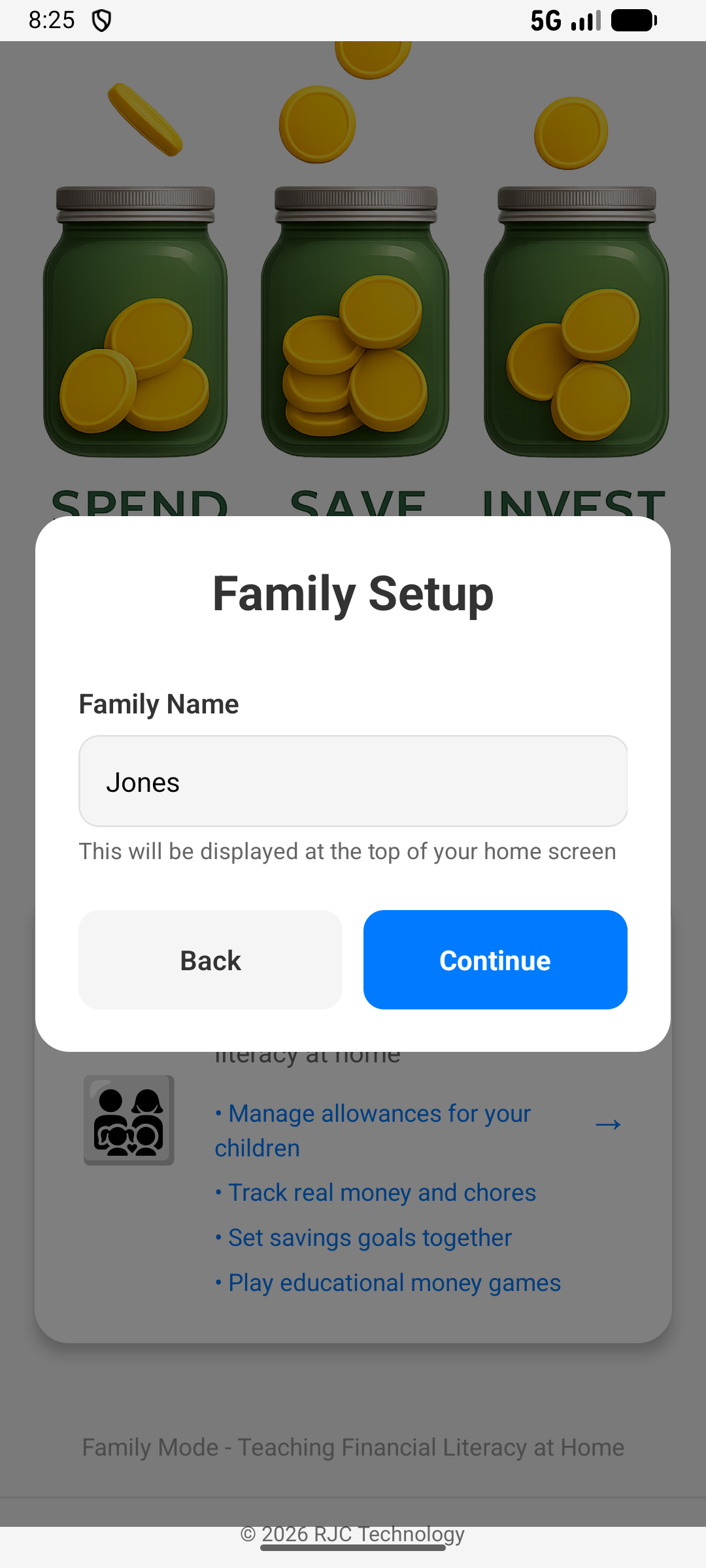
Spend, Save & Invest — From Day One
From the very first screen, kids see the three core money habits. Setup takes minutes — just enter your family name and you're ready to go.
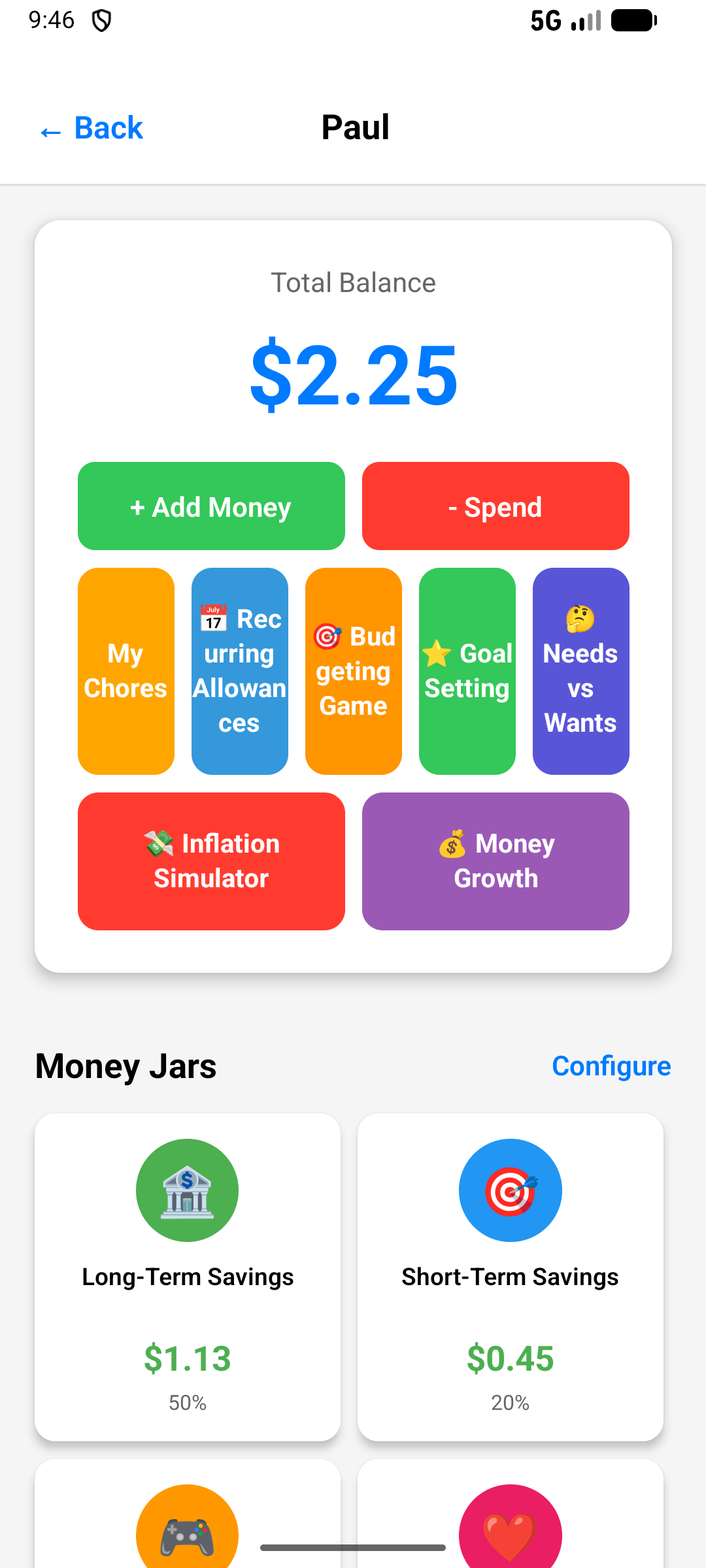
Child Dashboard
Everything a Kid Needs in One Screen
Each child has their own dashboard showing their total balance, money jars, chores, learning games, and financial tools — all in one place.
Parent Approval
Parent Approval Dashboard
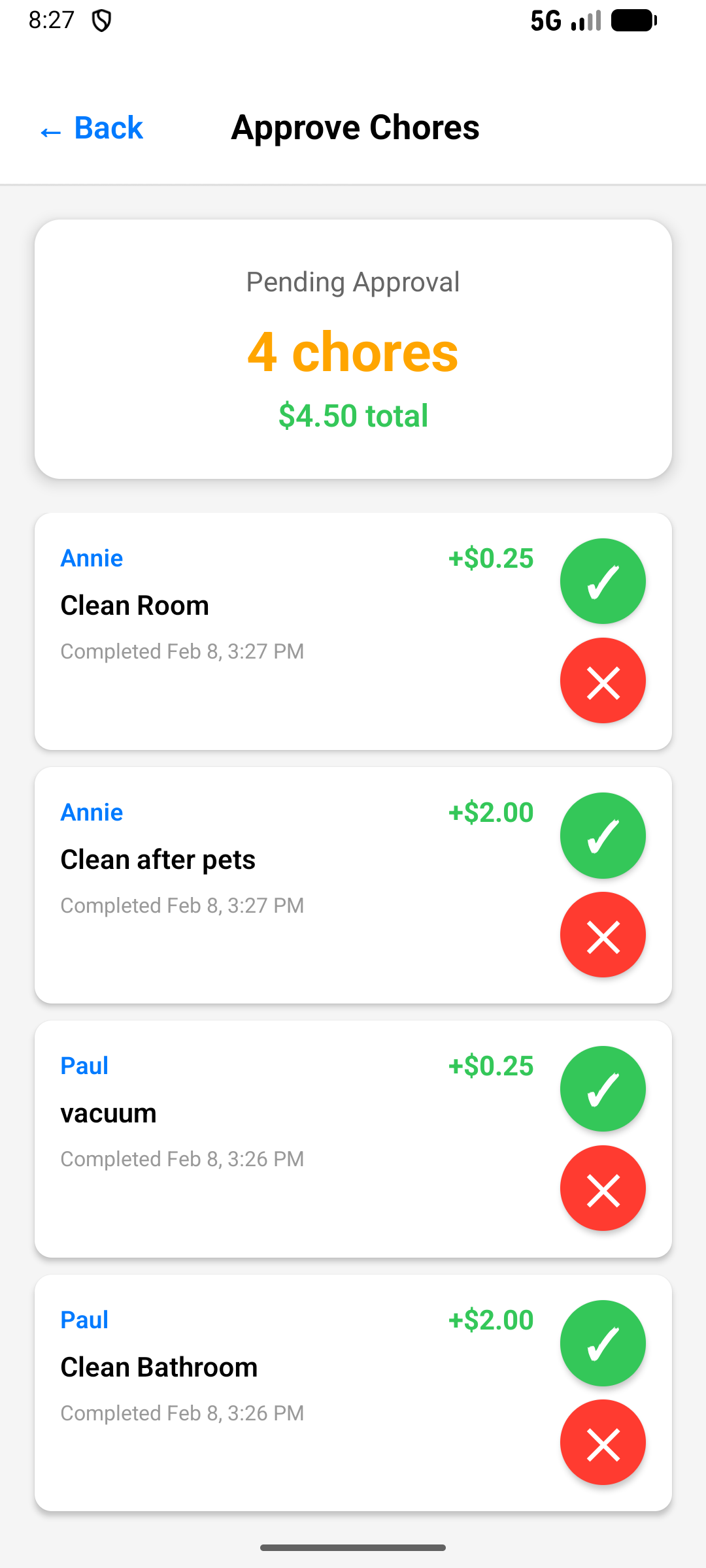
See all pending chores across all your children at a glance. Approve or reject with one tap. Know exactly what was done and when.
Chore Management
Chores & Jobs With Real Dollar Values
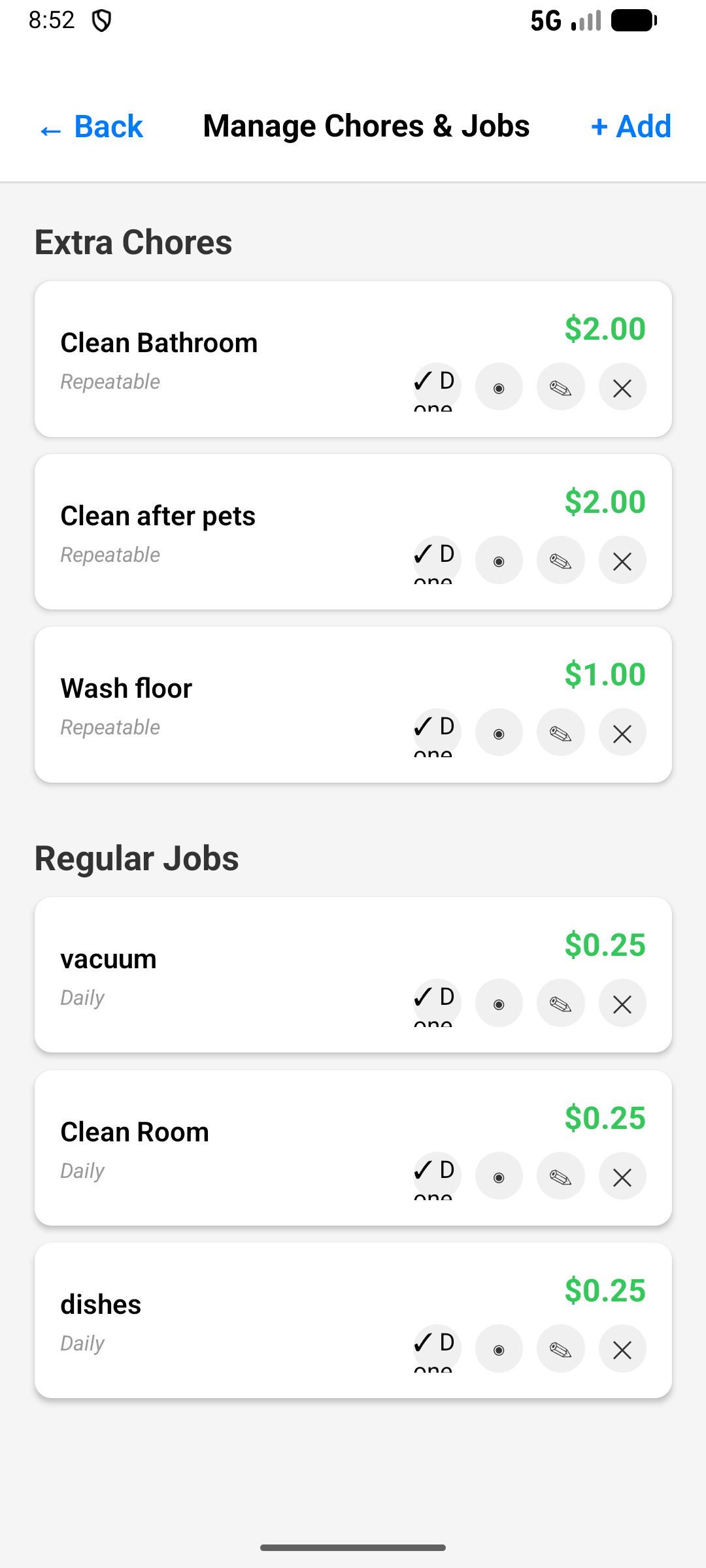
Create extra chores and regular jobs with custom values. Set daily, weekly, or one-time tasks — each with a dollar amount kids can earn.
Savings Goals
Save Toward Real Goals Kids Care About
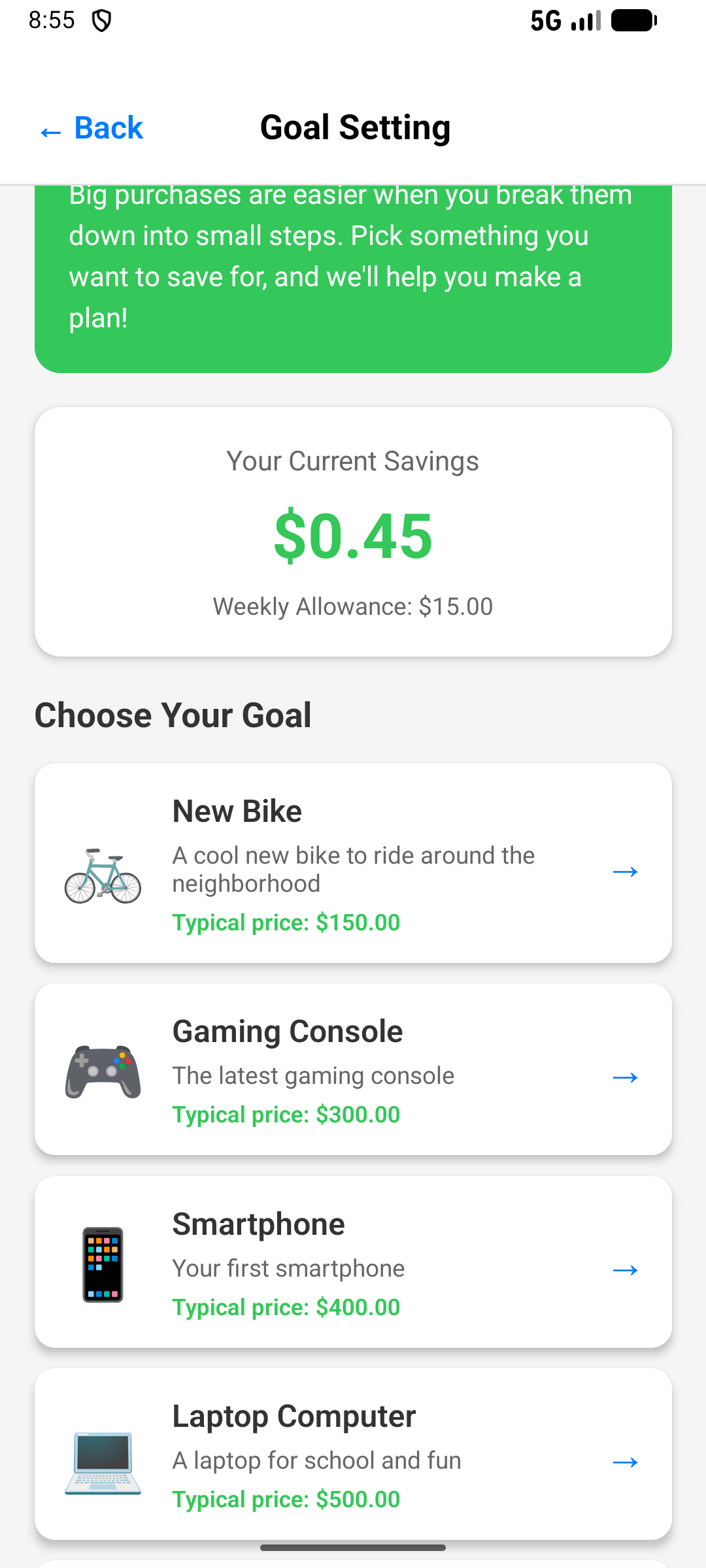
Kids pick savings goals like a new bike ($150), gaming console ($300), or smartphone ($400). The app shows exactly how their weekly savings gets them there.
Jar Setup
The App Teaches the Why, Not Just the How
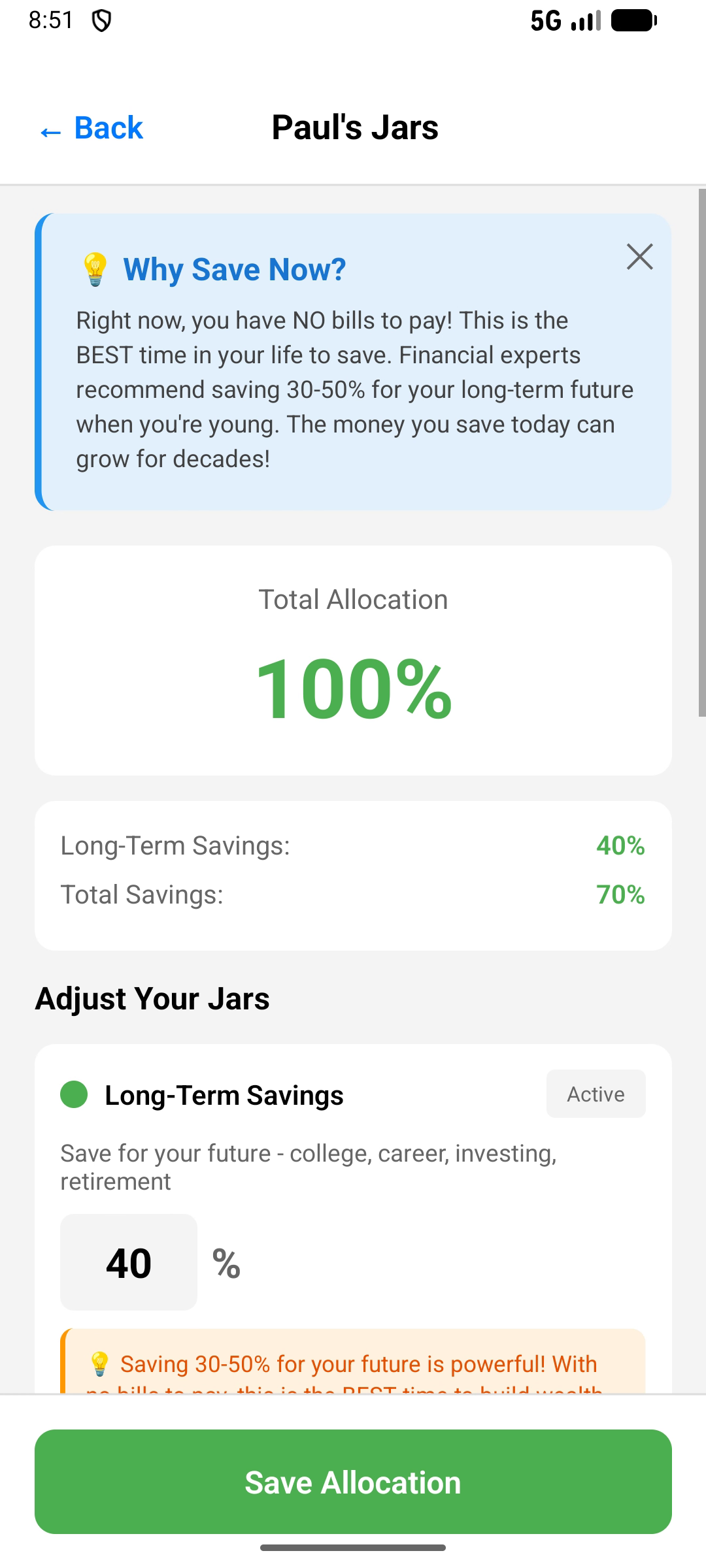
When setting up jar percentages, the app explains why saving now is so powerful — no bills, compound interest, decades of growth ahead. Kids don't just learn what to do, they understand why it matters.
$2.99 — One Time. Everything Included.
One purchase covers your whole family. No subscription, no recurring fees.
Run a classroom economy that rewards kindness, effort, and achievement — while teaching real financial literacy. No student accounts, no complexity.
Everything Included
Built for teachers and classrooms K-8
Everything lives on the teacher's device. Students don't need accounts or logins — just the teacher's phone or tablet and a smartboard.
Classroom Economy
Create your classroom, add students by first name, and set a class goal. Award virtual currency for behaviour, effort, and academics.
Reward What Matters
Reward kindness, improved test scores, leadership, helping others, class jobs, and anything else your classroom values.
Class Goal Tracker
Set a shared class goal like a pizza party, movie day, or extra recess. Watch the class progress bar fill together.
Smartboard Display Mode
Project your classroom economy on the smartboard with large fonts and high-contrast visuals. Hide teacher controls in one tap.
Bulk Actions
"Great class today, everyone!" — add rewards to all students at once. Fast, simple, designed for busy classrooms.
No Student Accounts
Students never log in. No accounts, no passwords, no COPPA concerns. The teacher's device is the entire system.
Custom Rewards
Create your own rewards or use pre-loaded templates. Set values, categories (kindness/academic/effort), and use them any time.
Year-End Reset
One tap resets all balances for a new school year. Keep student names or start fresh — your choice.
Goal Celebrations
When the class hits their goal, trigger a celebration animation. The class earned it — make it a moment they remember!
See It In Action
Real screens from the School Edition
Everything your classroom needs — from student management to financial literacy games — all in one app.
Student Management
Manage Your Whole Class
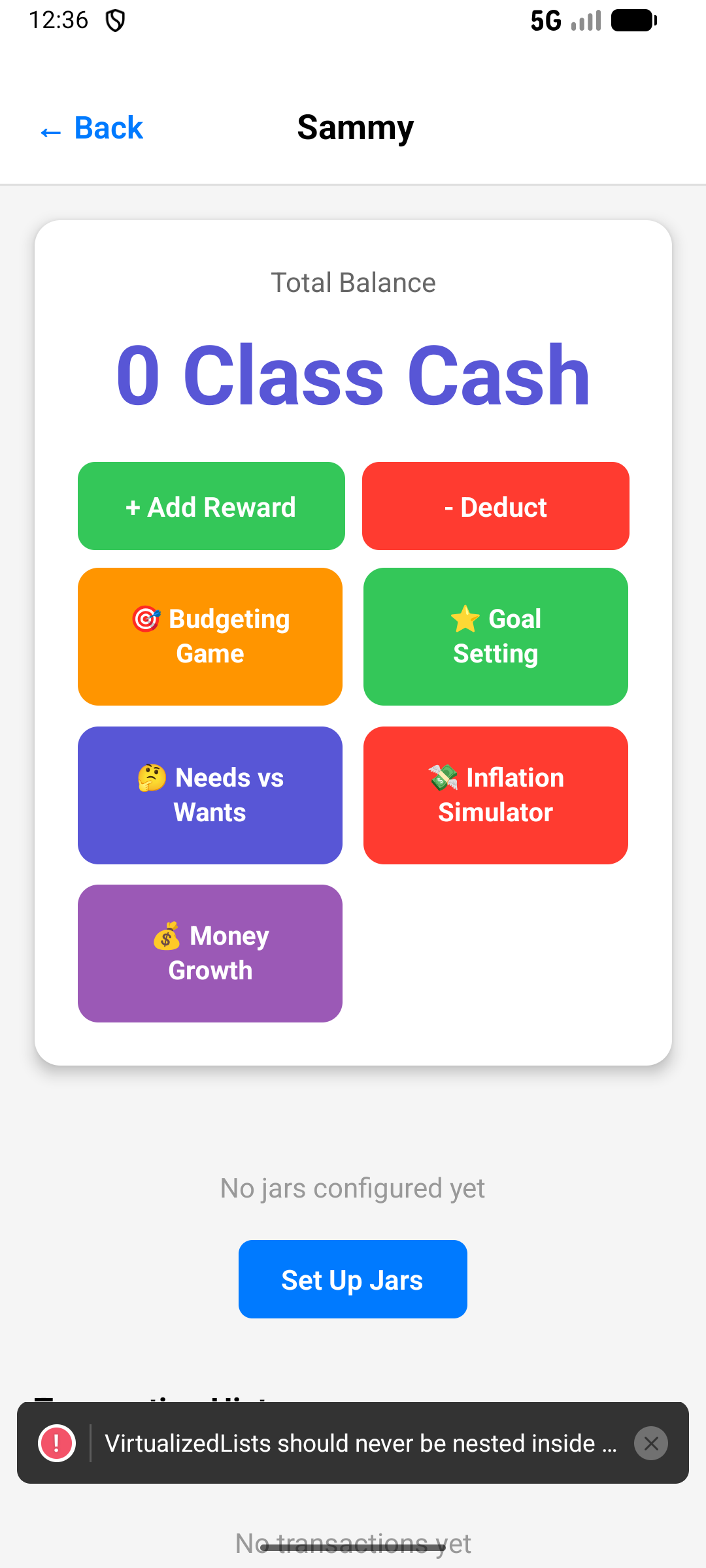
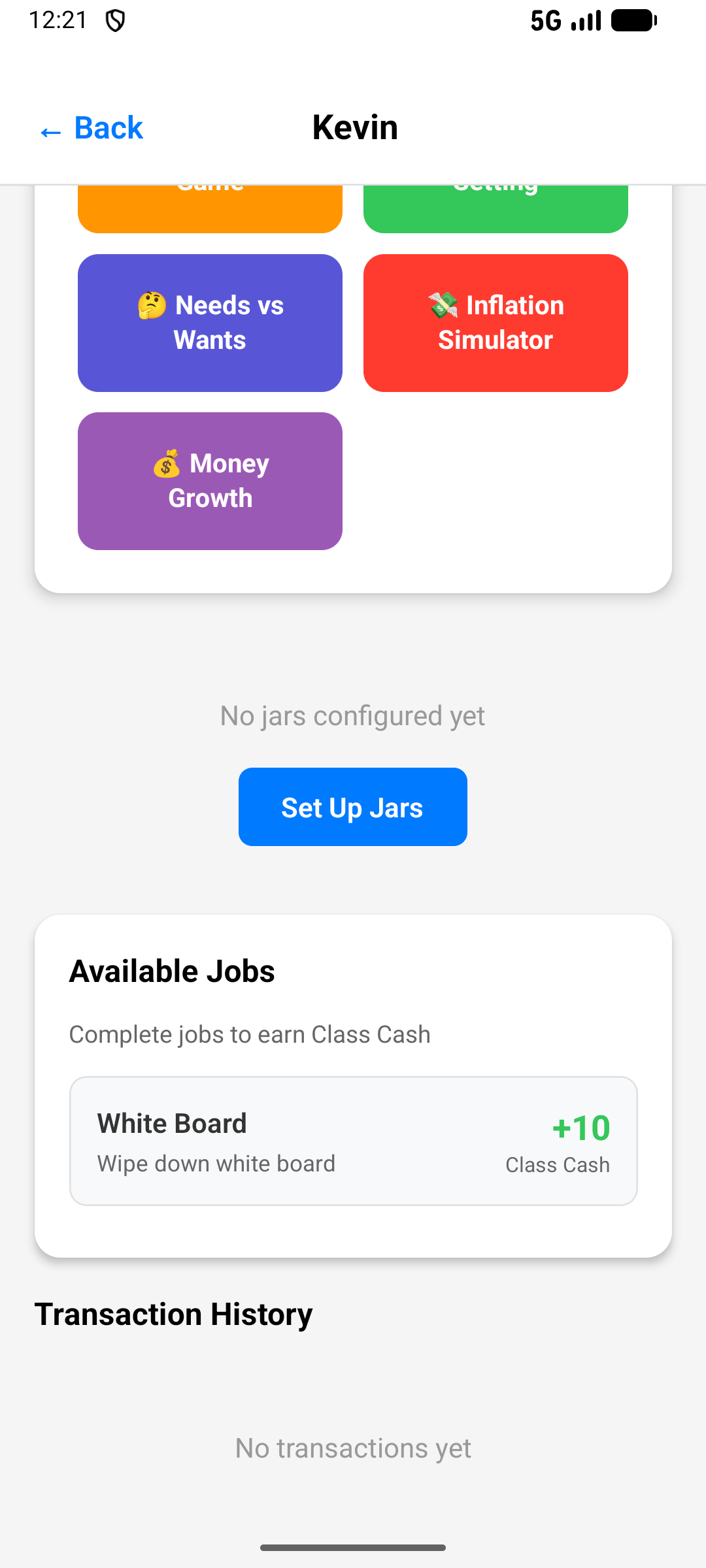
Add students by first name only. See balances at a glance. Edit or update any student in seconds. No accounts or logins needed.
Class Goals
Set Goals That Motivate
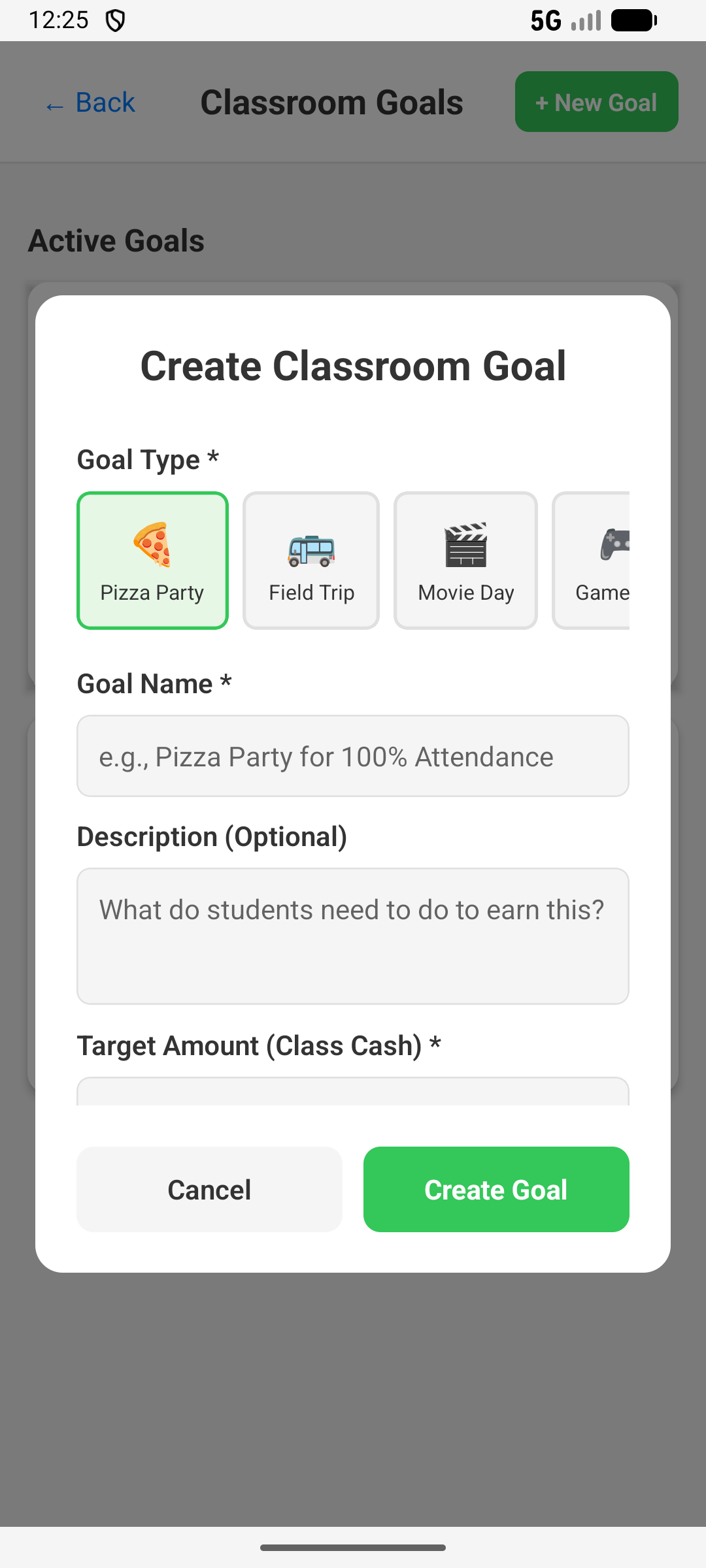
Create listening goals, academic targets, pizza parties and more. Watch the class work together toward shared rewards.
Easy Setup
Pizza Party? Field Trip? Movie Day?
Choose from preset goal types or create your own. Set the target amount in Class Cash and let the class earn it together.
Academic Rewards
Reward Tests, Quizzes & Projects
Award Class Cash for academic achievements. Track test scores, homework completion, and quiz results with instant rewards.
Classroom Jobs
Real Jobs, Real Responsibility
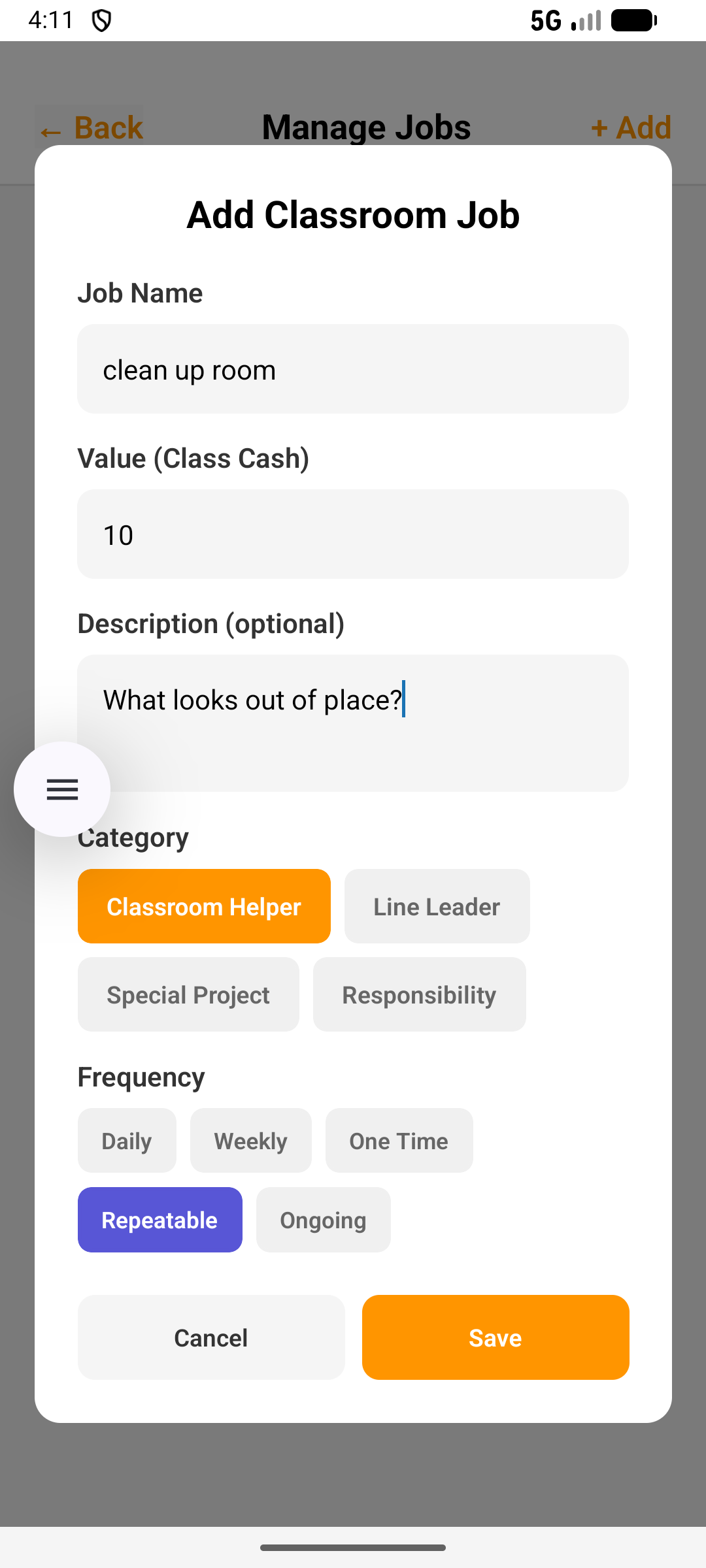
Create classroom jobs like line leader, board eraser, and classroom helper. Set frequencies and values. Build a community.
Financial Literacy Games
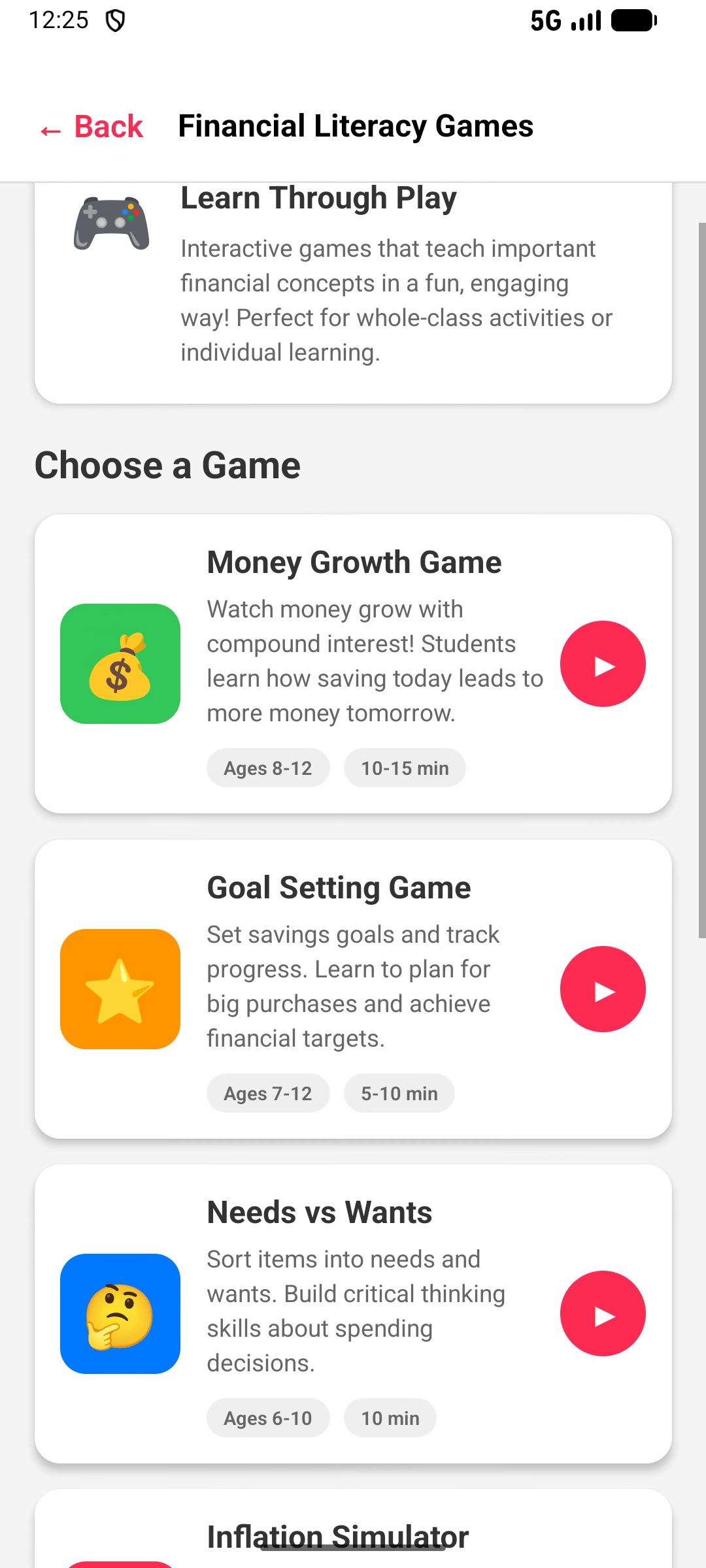
Five Games, One App — Ready to Teach
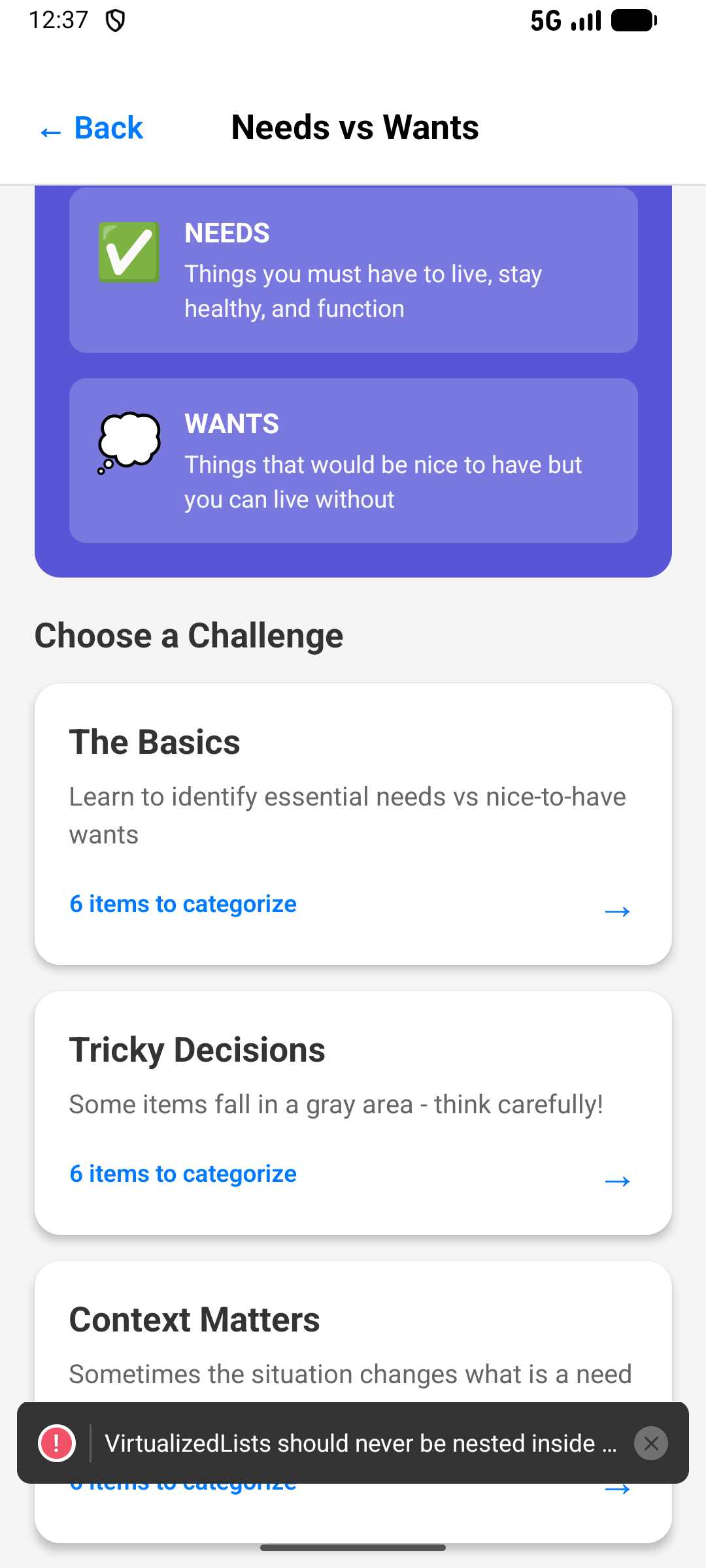
Money Growth, Goal Setting, Needs vs Wants, Inflation Simulator, and Budgeting Challenge — each with recommended age ranges and time estimates. Works as a whole-class activity, small groups, or individual learning. Teaching tips included.
School Edition Pricing
Purchase individually through the App Store or Google Play, or contact us for volume licensing and MDM deployment.
LicensesPrice per License
1 – 99$9.99
100 – 499$8.99
500 – 999$7.99
1,000 – 2,499$6.99
2,500+$4.99
Individual Purchase
$9.99 per license directly through the App Store or Google Play
Volume Licensing via MDM
Volume discounts are applied automatically through Apple School Manager or Google Admin Console